Deactivating the Zuddl campaign member status flow in Salesforce
Last updated: July 8, 2026
What This Does
When you install the Zuddl managed package in Salesforce, it adds an autolaunched flow named Campaign member status (API name Campaign_member_status_latest, namespace Zuddl). This flow runs automatically whenever a new campaign is created and adds the standard Zuddl campaign member statuses to it, so Zuddl can sync registration and attendance data against those statuses.
If you would rather manage campaign member statuses yourself and not have Zuddl add them automatically, you can deactivate this flow. This article explains how.
Warning: Deactivating this flow stops Zuddl statuses from being created automatically on new campaigns. Campaigns that already have the Zuddl statuses are not affected. If Zuddl relies on these statuses to sync member data, you may need to add the required statuses manually on future campaigns.
Before You Begin
You need a Salesforce user with System Administrator access (or the "Manage Flow" permission) to activate or deactivate flows.
The Zuddl managed package must already be installed in your Salesforce org.
Confirm with your team that automatic Zuddl status creation is no longer needed before turning the flow off.
Steps
In Salesforce, click the gear/Setup icon and open Setup.
In the Quick Find box, type Flows and select Flows under Process Automation.
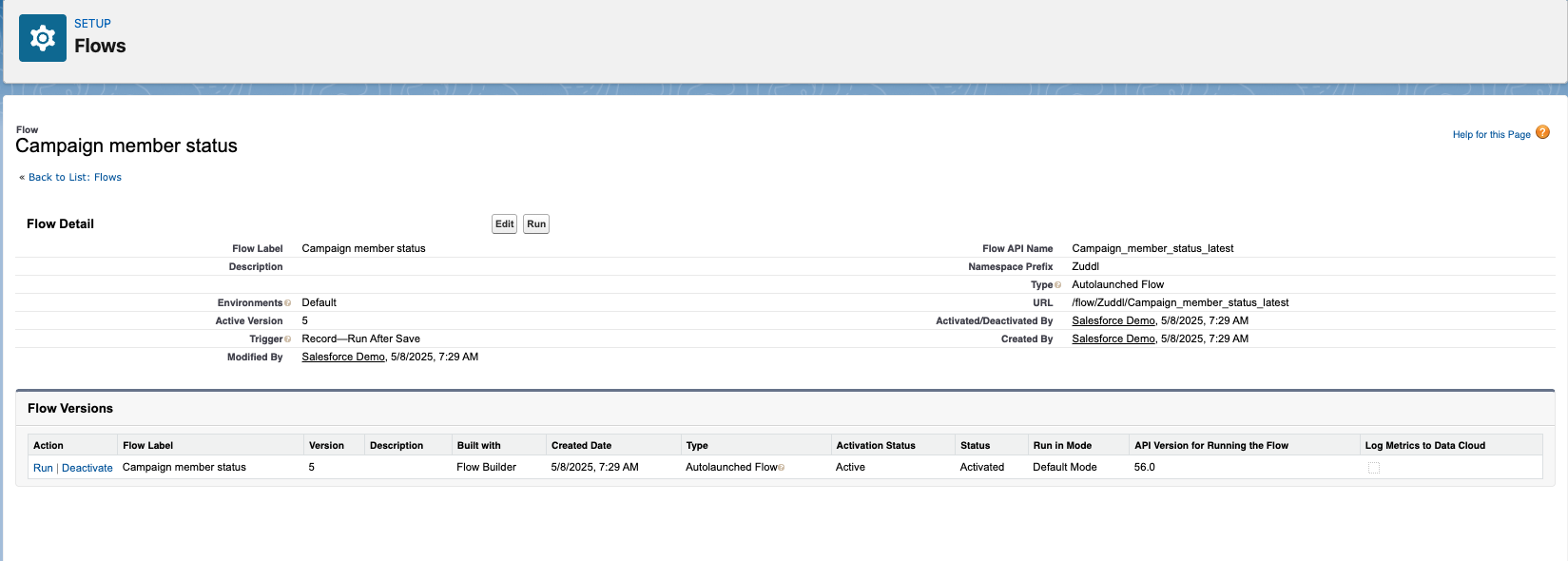
In the list of flows, locate Campaign member status (Flow API Name
Campaign_member_status_latest). Click the flow label to open its detail page.On the flow detail page, find the Flow Versions section at the bottom. Identify the row whose Status is Activated and Activation Status is Active.
In the Action column for that active version, click Deactivate.
Confirm the action if Salesforce prompts you. The version's status changes from Active/Activated to Inactive.
The flow detail page looks like the example below. Use the Deactivate link in the Action column of the active version row.
What Happens Next
Once the flow is deactivated, Salesforce no longer runs it when new campaigns are created, so the Zuddl campaign member statuses are no longer added automatically. Existing campaigns keep whatever statuses they already have.
If you want to re-enable automatic status creation later, return to the same Flow Versions section and click Activate on the version you want to run.
Notes
Deactivating a flow only stops future automatic runs — it does not delete the flow or any statuses that were already created.
Only one version of a flow can be active at a time. If you later reactivate, make sure you activate the correct (latest) version.
If you need Zuddl to continue syncing member data, ensure the required campaign member statuses still exist on your campaigns, even after deactivating the flow.