How to Add a Google Analytics Tracking Code for Registrations
Last updated: February 10, 2026
Google Analytics is a tool that lets you track and analyze visitor traffic and behavior on your page. Your registration page can be linked with Google Analytics to gain insights from visitor activity and help you meet your goals.
To add tracking to your landing page:
On Google Analytics dashboard, go to Admin > Property column > Tracking info.
Copy your tracking code. This code is in the below format:
script async src=“https://www.googletagmanager.com/gtag/js?id=UA-XXXXXXXXX-1”>script>

script>

window.dataLayer = window.dataLayer || [];

function gtag(){dataLayer.push(arguments);}

gtag(‘js’, new Date());

gtag(‘config’, ‘UA-XXXXXXXXX’);

script>
Now, inside the event setup on Zuddl, go to Registration > Registration page.
Click the edit registration page and enter the page builder
Go to Settings > Head HTML.
Paste the tracking code under Head HTML textbox.
You can also add the tracking code on the Snippet section which would apply the tracking code across all your landing pages
Refer: https://support.zuddl.com/articles/3821704654-how-to-add-a-snippet-to-your-zuddl-registration-page
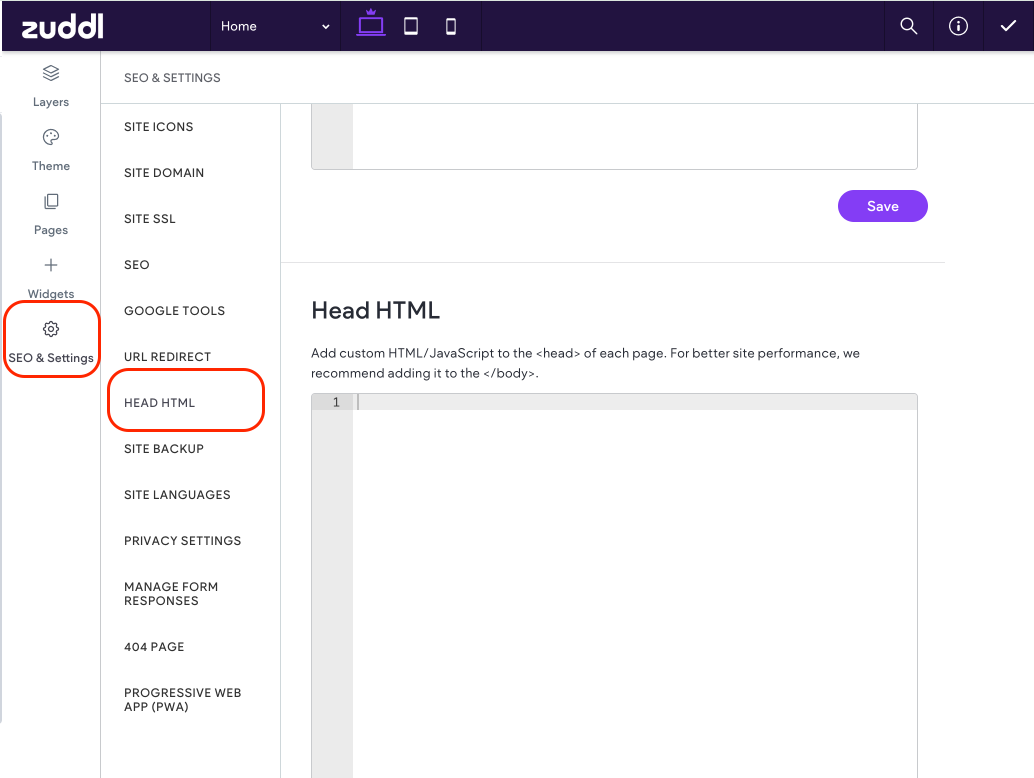
Now, add the custom JS to the code.
function handleRegistrationSuccess(event) { // write your logic here } window.addEventListener('zuddl.registration.success', handleRegistrationSuccess);
This will enable tracking for your registration page. The complete sample code is shown below:
script async src="https://www.googletagmanager.com/gtag/js?id=X-XXXXXXX">script>
script>window.dataLayer = window.dataLayer || [];
  function gtag(){dataLayer.push(arguments);}
  gtag('js', new Date());

  gtag('config', 'X-XXXXXXXX');

  // Function to send registration success event to GA4function handleRegistrationSuccess(event) {
      const registrationData = event.detail || {};

      gtag('event', 'registration_success', {
          event_category: 'Registration',
          event_label: registrationData.attendeeDetails[0].email || 'unknown',
          value: 1 // You can modify based on your needs
      });

      console.log("Sent registration success event to GA4:", registrationData);
  }

  // Listen for Zuddl registration success eventwindow.addEventListener('zuddl.registration.success', handleRegistrationSuccess);
script>
Field shown in ‘event.detail’
{
  "attendeeDetails": [
    {
      "name": "John",
      "email": "john.acme@zuddl.com"
    },
    {
      "name": "Virat",
      "email": "virat@acme.com"
    }
  ]
}
Zuddl event listeners
Zuddl supports JavaScript event listeners that can be used to track and manipulate the registration form behavior. Below are the two primary events emitted by the Zuddl registration form that you can hook into using custom scripts on your landing page:
zuddl.registration.form.loaded
This event is triggered once the registration form has successfully loaded. It contains key metadata about the event.
sample event payload:{ status: "Form Load Successful", eventName: "Your Event Name", eventId: "xxxx-xxxx-xxxx" }How to use:
window.addEventListener('zuddl.registration.form.loaded', function (event) {
  const formMeta = event.detail;
  console.log('Zuddl form loaded:', formMeta);

  // You can perform custom actions here, such as logging or injecting custom UI.
});
zuddl.registration.success
This event is triggered upon successful submission of the registration form. It contains details of all attendees who registered.
Sample event payload:
{
  attendeeDetails: [
    {
      name: "John",
      email: "
john.acme@zuddl.com"
    },
    {
      name: "Virat",
      email: "virat@acme.com"
    }
  ]
}
How to use:
window.addEventListener('zuddl.registration.success', function (event) {
  const registrationData = event.detail;
  console.log('Registration successful:', registrationData);

  // You can push this data to analytics platforms, CRMs, or show a custom thank-you message.
});
Learn more about how to use the Google Analytics tracking.
Data collection may take up to 30 minutes to begin. Once started, you can use the real-time report on your Google Analytics dashboard to verify that you're receiving data.