Introducing flow builder for webinars
Last updated: October 16, 2025
Everything you could do with the current Webinar forms, plus a lot more options and customizations — is now available in one powerful, flexible, and unified experience with the flow builder.
🧭 Why this upgrade?
We’re bringing the power of Zuddl’s Flow Builder to Webinars — one of the most requested upgrades. Until now, webinars had a basic registration form — simple and functional, but limited in design and flexibility.
With this upgrade, webinar registration works just like it does in our conference and field event products, giving you complete control over your registration experience.
Everything you could do before remains available — and you’ll now have new options for logic, customization, and branding.
⚠ This update applies only to webinars created on or after October 16, 2025. Existing webinars remain unchanged.
🚀 What’s New
The ‘Form’ section under Registration is now called ‘Registration Flow’.
You can now:
Design multi-step registrations instead of single long form.
Use extra field types like country, radio buttons, rich text etc.,
Add logics, conditions, and branching in the registration flow.
Use custom CSS for branding.
Here’s a comparison of what’s possible with the new flow builder compared to the basic form.
Feature | Support in basic Forms? | Support in Flow Builder? | How to do it (Flow Builder) |
Multi-step registration flow | ❌ No | ✅ Yes | Add multiple forms or steps in the flow builder. |
New custom field types like URL, Country, Radio buttons, Multi-select, Rich text, Date, Date time | ❌ No | ✅ Yes | Available as a custom field type. |
Customizable placeholders | ❌ No | ✅ Yes | Available in advanced settings per field |
Hidden fields | ❌ No | ✅ Yes | Available in advanced settings per field |
Default values | ❌ No | ✅ Yes | Available in advanced settings per field |
Field description | ❌ No | ✅ Yes | Available in advanced settings per field |
Approval step | ❌ No | ✅ Yes | Add approval step in the flow sequence & configure the messaging. |
Customizable Registration success page | ❌ No | ✅ Yes | Define the content in the ‘Thank you page’ step |
Branching logic / Conditional flows | ❌ No | ✅ Yes | Under the branching tab, configure branching rules to jump or skip steps . |
Field visibility logic | ✅ Yes | ✅ Yes | Add show/hide logic based on other fields |
Disclaimers and consents (checkbox) | ✅ Yes | ✅ Yes | Add a checkbox field with consent text |
Custom CSS Branding | ❌ No | ✅ Yes | Use Custom CSS in Flow branding. |
Customizable Screens | ❌ No | ✅ Yes | In flow advanced settings > Standard screens, Define content for screens like Approvals, event ended etc., |
Embed the registration form on your event pages | ✅ Yes | ✅ Yes | Copy the flow embed code in the flow builder |
Login / OTP / Magic link support | ✅ Yes | ✅ Yes | Appears automatically below the flow form for attendees |
Track abandoned registrations | ❌ No | ✅ Yes | Available in People > Attendees > Abandoned registrations tab |
✨ The Experience: Same simplicity, more flexibility
The new flow builder keeps your familiar webinar registration experience intact:
Attendees still register directly from the Webinar landing page.
They still receive confirmation emails and login via magic link or Verification codes.
Organizers still configure registration options from the same “Registration” section.
What changes is how much you can do — now you can shape the registration experience exactly how you want it.
Example: A Multistep registration form with branching to skip approvals based on a particular field.
🧠 Things to Know
This upgrade applies only to new webinars created after October 16th, 2025.
Existing webinars will continue using the old form — no changes.
Duplicating existing webinars with forms, will still create webinars with forms.
You must publish the flow to apply any changes made in the registration flow.
The old ‘Attendee registration approval’ toggle is deprecated. Approval can be added directly as a step in the flow builder.
All emails, confirmation flows, and integrations will continue working as before.
All data and analytics remain intact — no reconfiguration needed.
💬 FAQs
1. Will my existing webinars break or change?
No. Existing webinars will remain as they are. Only new webinars will use Flow Builder.
2. Will attendees notice any difference?
Only visually — the registration experience will look more polished, branded, and responsive.
💡 In short: The Webinar registration form has evolved — same workflow, new flexibility, and full creative control.
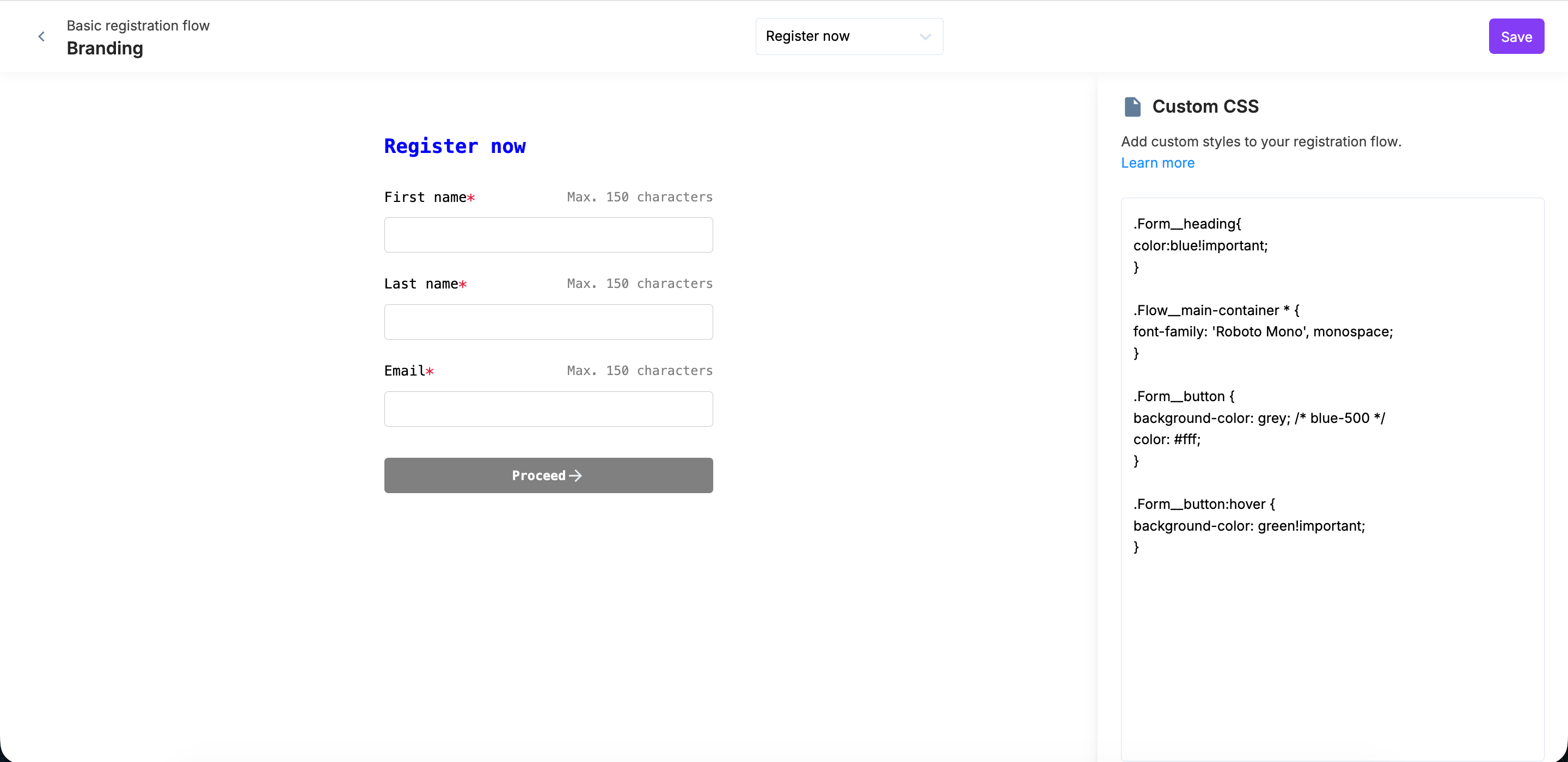
Sample CSS code for branding:
.Form__heading{
color:blue!important;
}

.Flow__main-container * {
font-family: 'Roboto Mono', monospace;
}

.Form__button {
background-color: grey; /* blue-500 */
color: #fff;
}

.Form__button:hover {
background-color: green!important;
}
Here’s how the above code will brand the forms