How to Whitelist Zuddl Domains and Ports
Last updated: October 26, 2026
Zuddl uses WebRTC technology for its real-time engagement functions and requires network configuration for environments with restricted access. If you are behind a firewall or a VPN and are trying to attend an event, run a session in Studio, or upload files such as presentations and images, you may encounter errors or connection failures.
This set up may require you to reach out to your IT team.
In order to prevent such failures, Zuddl recommends whitelisting certain domains and ports, thereby providing a faster and efficient service and an overall better meeting experience. The illustration below depicts how you can whitelist Zuddl and WebRTC ports and domains to grant access to your resources through a firewall or across a VPN.
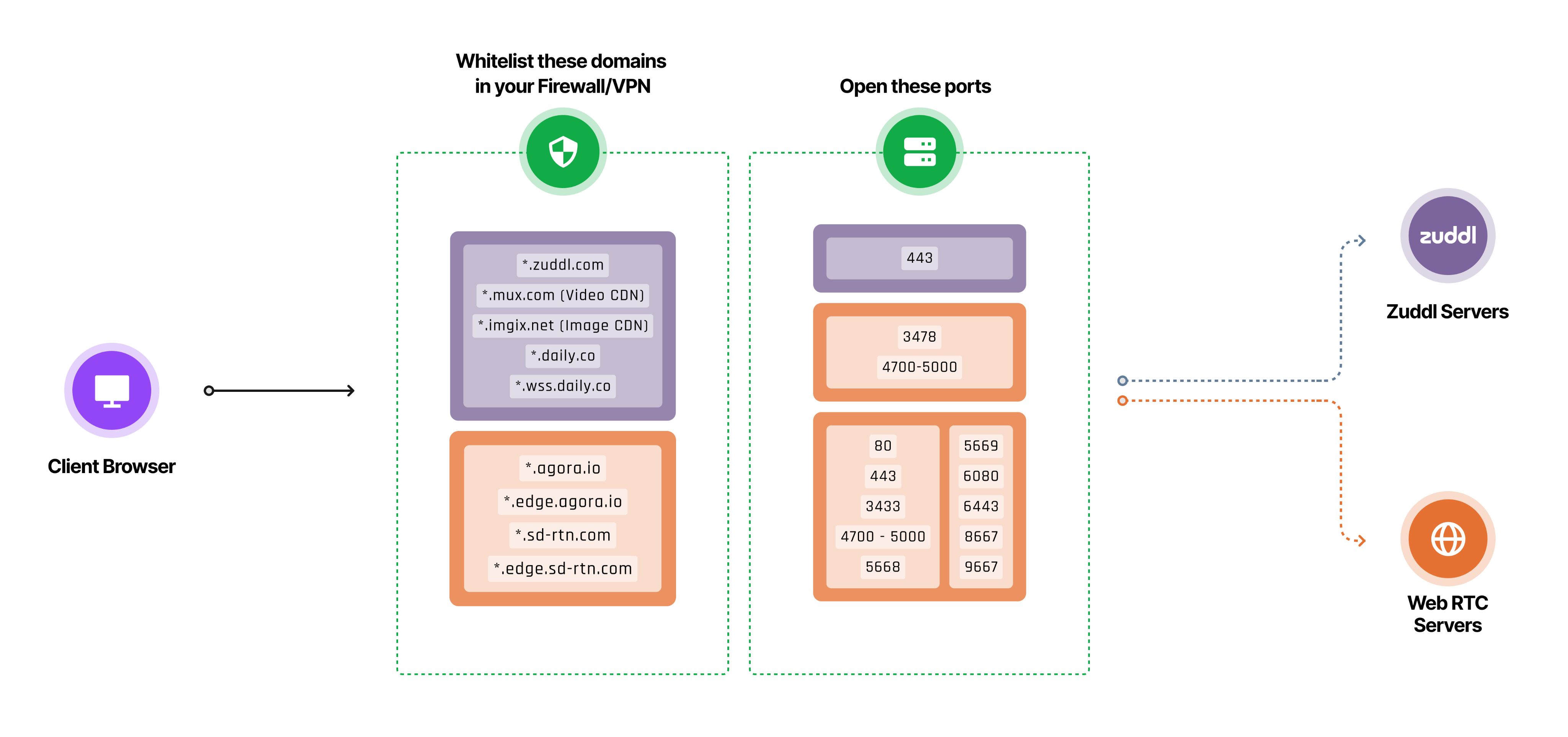
Function-wise whitelisting
Function | Domains | TCP | UDP | Websockets |
Zuddl platform and CDN | *.zuddl.com *.imgix.net *.pusher.com | 443 | ||
File uploads (presentations, PDFs, images, Studio scene thumbnails) | *.amazonaws.com | 443 | ||
Video playback and uploads (Mux) | *.mux.com *.litix.io storage.googleapis.com | 443 | ||
WebRTC (Audio & Video) | *.agora.io *.edge.agora.io *.sd-rtn.com *.edge.sd-rtn.com | 80 443 3433 4700 - 5000 5668 5669 6080 6443 8667 9667 | 3478 4700 - 5000 | ✔ |
Pusher websockets | ws-ap2.pusher.com | 443 | ✔ | |
Zuddl large rooms network infrastructure | *.daily.co *.wss.daily.co | 443 | 3478 | ✔ |
Note on file uploads:
Zuddl sends uploaded files directly from the browser to cloud storage, not through *.zuddl.com. Presentations, PDFs and images go to AWS S3 (*.amazonaws.com). Videos go to our video provider, Mux, through storage.googleapis.com. Your firewall or proxy must allow HTTPS uploads to these hosts, not only downloads.
Signs that file uploads are blocked
A presentation, PDF, image or video upload never finishes.
Scene thumbnails in Studio stay on a loading spinner.
Before contacting your IT team, turn off ad blockers and browser extensions and try the upload again. Some extensions block uploads to cloud storage.
If the above whitelisting cannot be implemented because your organization uses a stricter firewall with many restrictions, please reach out to our customer success manager.
Note on websockets:
Websockets need to be allowed on the device browsers (like Google Chrome, Microsoft Edge, etc.) and also in the network whitelist.