How to Set Up a Custom Payment Gateway
Last updated: November 11, 2026
What This Does
The Custom Payment Gateway integration lets you collect ticket payments through your own payment provider instead of a built-in gateway such as Stripe or PayPal. Attendees pay on a payment page that you host. Zuddl still handles ticketing, registration, and order management.
The flow works like this:
At checkout, Zuddl redirects the attendee to your hosted payment page with an order reference.
Your backend fetches the amount and currency for that order from Zuddl.
You charge the attendee on your payment gateway.
Your backend sends the payment result to Zuddl by webhook. On success, Zuddl confirms the order and completes the registration.
You redirect the attendee back to Zuddl.
When an organizer issues a refund in Zuddl, Zuddl calls your refund endpoint.
Note: Custom Payment Gateway is available on request. Contact your Zuddl Customer Success Manager to enable it for your organization before you start.
Before You Begin
Custom Payment Gateway is enabled for your organization by Zuddl.
You have access to configure payment gateways for your organization.
You have a Zuddl API key with Read and Write access. See How to Access your API Keys.
You have the Zuddl API base URL for your region (US or EU) from your Zuddl representative.
Your developers have built:
A hosted payment page that attendees are redirected to.
A refund endpoint on your backend that Zuddl can call.
A refund secret key that you choose, used to authenticate Zuddl's refund calls.
Warning: Call the Zuddl APIs below only from your server, using your API key. Never call them from the browser or expose your API key or refund secret key in front-end code.
Steps
In the Zuddl dashboard, open your organization's payment gateway settings and add a new payment gateway.
Select Custom as the payment gateway type.
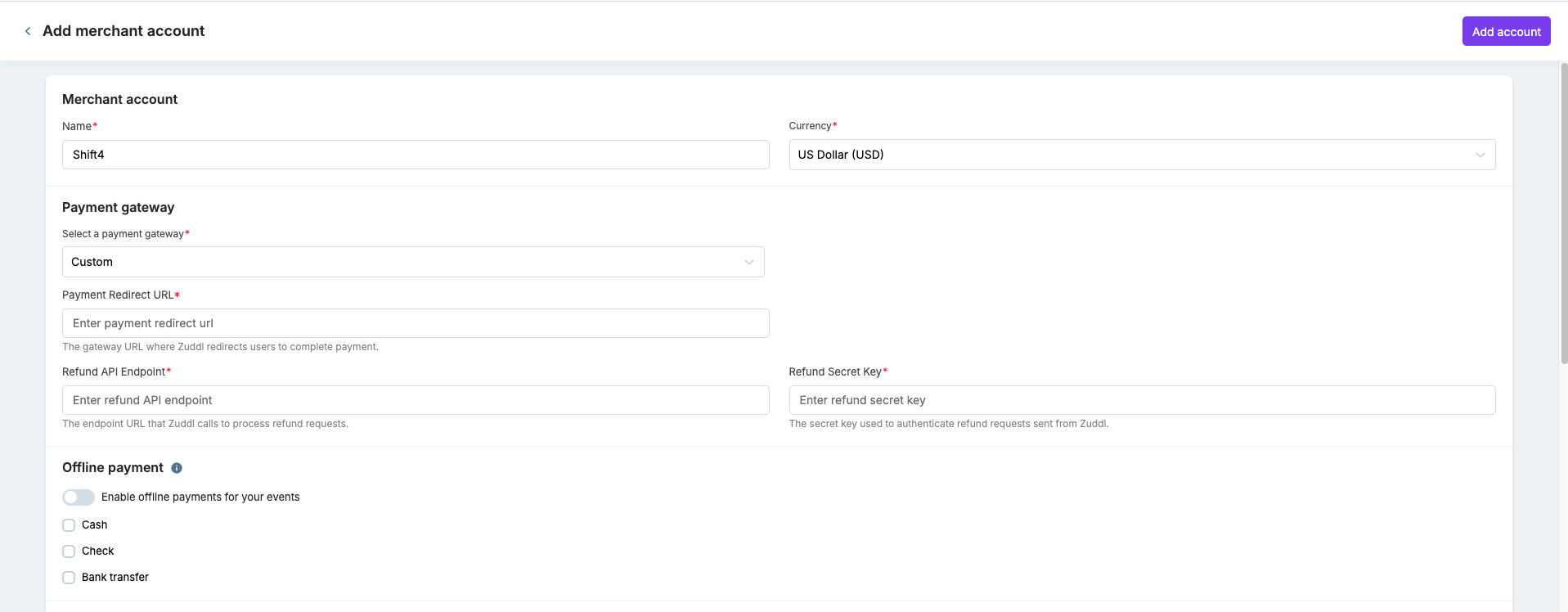
Fill in the three required fields:
Payment Redirect URL: the URL of your hosted payment page.
Refund API Endpoint: the URL on your backend that Zuddl calls to process refunds.
Refund Secret Key: the secret Zuddl uses to authenticate its refund calls.
Save the gateway and copy its Payment Gateway ID. You need it for the webhook URL.
Assign the gateway to the event you want to sell tickets for.
Build your payment page and backend using the API reference in Advanced Setup below.
Place a test order on the event and confirm that the attendee's registration completes after payment.
What Happens Next
When an attendee checks out, Zuddl sends them to your payment page. After your backend reports a successful payment, Zuddl marks the order as paid and completes the attendee's registration. If you report a failed payment, the order is marked as failed. Refunds that organizers issue in Zuddl are sent to your refund endpoint.
Advanced Setup
1. The checkout redirect
At checkout, Zuddl redirects the attendee's browser to your payment page with two query parameters:
{your-payment-redirect-url}?checkoutId={checkoutId}&returnUrl={returnUrl}
checkoutId: the order reference. Use it to look up the amount to charge.returnUrl: where to send the attendee after payment. It is URL-encoded. Decode it and redirect to it exactly as given, without changing its parameters.
2. Get the order details (Zuddl API)
Call this from your backend to get the amount and currency to charge. Pass your API key in the Authorization header.
GET {API_BASE_URL}/custom-payment-gateway/{checkoutId}
Authorization: {your-api-key}
Example response:
{
  "currency": "USD",
  "price": 123.45,
  "expiresAt": "2026-06-02T12:00:00Z",
  "eventId": "...",
  "paymentGatewayId": "..."
}
priceis the final amount to charge. Credits and discounts are already applied.expiresAtis when the checkout expires. Complete the payment and send the webhook before this time.
3. Send the payment result to Zuddl (webhook)
After you process the payment, send the result from your backend:
POST {API_BASE_URL}/custom-payment-gateway/{paymentGatewayId}/webhook
Authorization: {your-api-key}
Content-Type: application/json
Request body:
{
  "checkoutId": "659d88a3-42d2-42db-86cd-dc7e89eac57f",
  "chargeId": "your-gateway-charge-id",
  "webhookEventType": "PAYMENT_SUCCEEDED",
  "amount": 123.45,
  "billingDetails": {
    "email": "buyer@example.com",
    "firstName": "Jane",
    "lastName": "Doe",
    "phone": "+15555550100",
    "company": "Acme Inc",
    "street": "123 Main St",
    "city": "San Francisco",
    "state": "CA",
    "postal": "94105",
    "country": "US"
  }
}
Field | Required | Notes |
|---|---|---|
| Yes | The order reference from the redirect. |
| Yes | The transaction or charge ID from your gateway. Zuddl sends it back to you for refunds. |
| Yes |
|
| Yes | The amount charged. Must be greater than 0 for |
| No | Purchaser details. |
Warning: A 200 response means Zuddl has received the webhook, not that the order is confirmed. Zuddl processes it in the background. If a required field is missing or invalid, the webhook is ignored and the order is not confirmed. Validate your payload before you send it, and confirm the registration completed during testing.
4. Handle refunds (your endpoint)
When an organizer issues a refund in Zuddl, Zuddl calls your refund endpoint:
POST {your-refund-api-endpoint}
Authorization: Bearer {base64(refundSecretKey)}
Content-Type: application/json
Request body sent by Zuddl:
{
  "chargeId": "your-gateway-charge-id",
  "amount": 123.45
}
Your endpoint must respond with:
{
  "success": true,
  "refundId": "your-refund-id"
}
The
Authorizationheader carries your Refund Secret Key, Base64-encoded, as a Bearer token. Decode it and check it against your key before processing.amountis the amount the organizer chose to refund. It can be less than the original charge for partial refunds.If the refund cannot be processed, return
"success": falseor an error status. Zuddl treats the refund as failed. Timeouts are also treated as failed.
Notes
Retries are safe. Once an order is paid, Zuddl ignores further webhooks for the same
checkoutId, so resending a webhook won't confirm an order twice.Billing details: email, first name, and last name are only used if the attendee didn't already provide them during registration. Phone, company, and address values you send replace the existing ones.
Webhook rejected with 401 or 403: check that your API key belongs to the same organization as the payment gateway and has Write access.
Order details return 404: check that the
checkoutIdis copied exactly from the redirect, and that you are using an API key from the same organization as the event.Store your API key and refund secret key securely, and rotate them if they are exposed.
For help enabling or configuring this integration, contact your Zuddl representative or Zuddl Support.